
Did I get it right? And how do I create the Insertion Script Creator?

The base for this script is inside my 1st post on: Create your own SQL Insertion Script, so to create something in this next level of abstraction, you need to understand what is happening on this post fully:
Create your own SQL Insertion Script Key words: backup, create an insertion script, transport data, data engineering
Ok, now that you know how to create a script to create a table based on an existing one, we will create a script that creates this creation script! (Read the first arcticle, is worthit)

We could draw this abstraction as the image below:
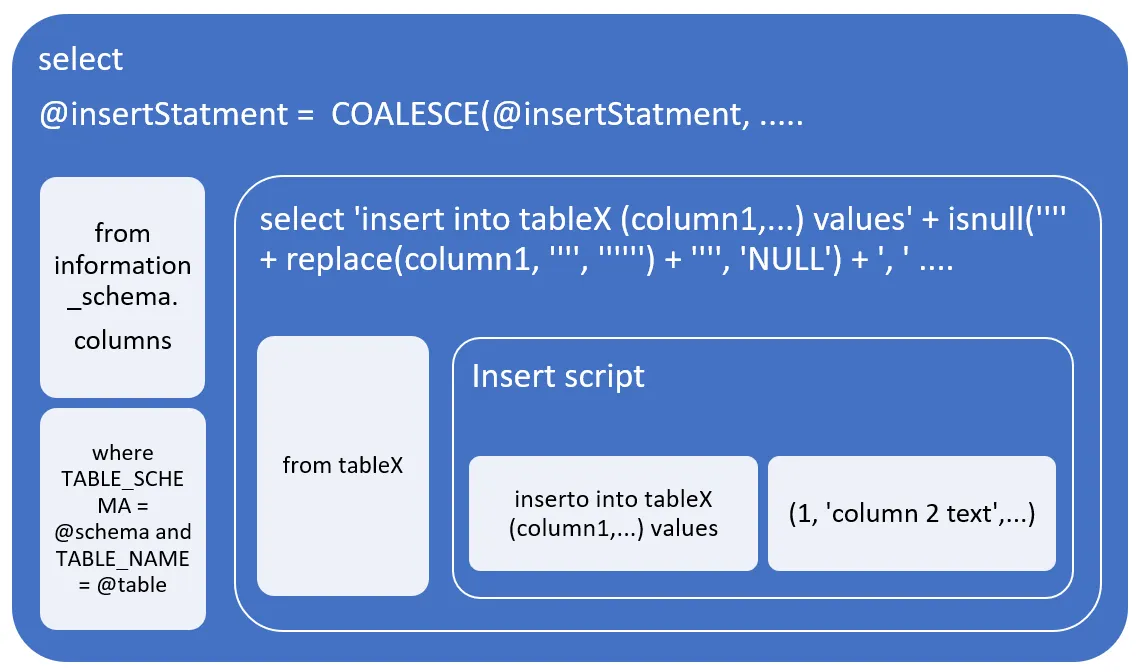 From the left to right, top to bottom, more abstract to less.
The main goal here is to create an insertion script really, really fast, and create it with all of your data, from a chosen table.
So we’ll create a script that can figure out all the columns you have on a schema.table of your choosing, then query against the metadata of your table, using all the column information from information_schema.columns.
With your metadata, we’ll create a select script that has, as the 1st column,n a string/varchar value: ‘insert into …’, so the more abstracted script will create a script that creates another script, and so on, at the final we will create an insertion script for every line you have in your table, without needing to look deep inside your metadata, because our script will figure out how the data should be queried and how to behave.
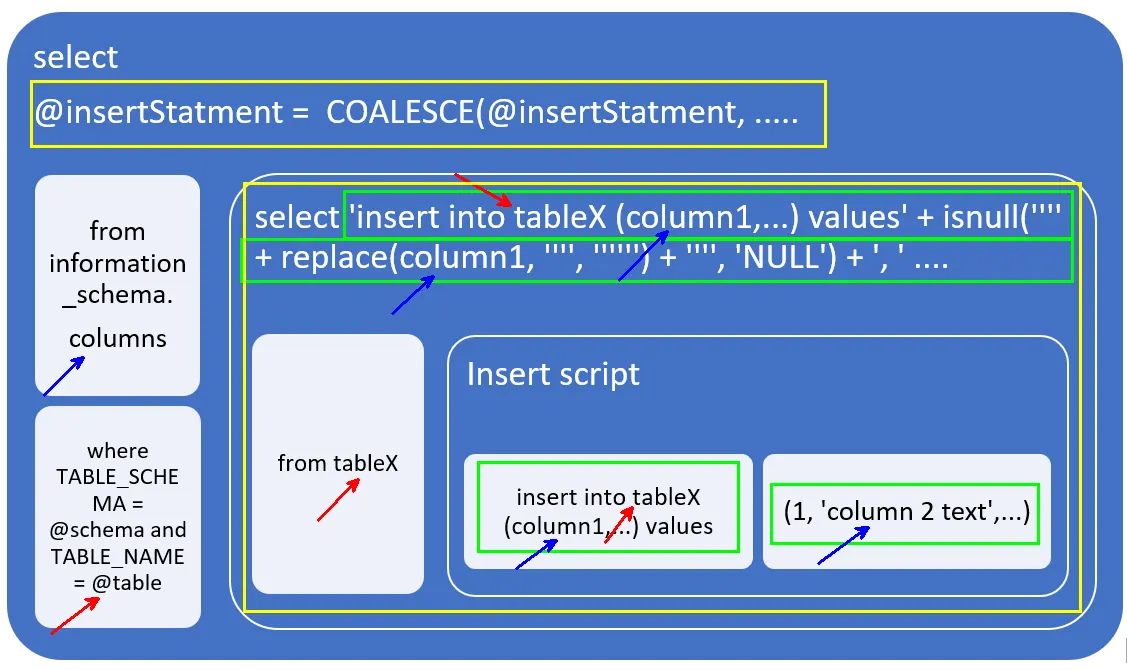 Highlight over how the metadata helps to create scripts and how deep it goes into.
In yellow: the abstraction layer, with the join of all strings that we have.

In green: the insertion into the statement.

That’s it!
 We’re groing your brain that will look just like…
So the final script could be this one, where the main two parameters are: Schema and Table names. After that, we’ll use a GUID and a DateTime column for every row we create beacause on the new table, we use GUID columns as primary keys (PKs).
At the top of the cake, we get the SELECT statement that deals with the metadata of the table you chose. Right now, we can deal with: varchar, char, int, smallint, float, and datetime metadata. You could improve this script in the repo on GitHub.
declare @schema varchar(max) = 'Sales'
declare @table varchar(max) = 'customers'


Declare @val Varchar(MAX) = '''(uuid_generate_v4(), now()'''
declare @insertStatment varchar(max) = '("Id", "CreateDate"'

select
 @insertStatment = COALESCE(@insertStatment + ', ' + COLUMN_NAME , COLUMN_NAME ),
 @val = COALESCE(@val + ' + '', '' + '
  +
  case DATA_TYPE
  when 'varchar' then 'isnull('''''''' + '
  when 'char' then 'isnull('''''''' + '
  when 'int' then 'isnull(cast('
  when 'smallint' then 'isnull(cast('
  when 'float' then 'isnull(cast('
  when 'datetime' then 'isnull(''''''''+convert(varchar, '
  else ''
  end +
  COLUMN_NAME
  +
  case DATA_TYPE
  when 'varchar' then ' + '''''''', ''NULL'')'
  when 'char' then ' + '''''''', ''NULL'')'
  when 'int' then ' as varchar(max)), ''NULL'')'
  when 'smallint' then ' as varchar(max)), ''NULL'')'
  when 'float' then ' as varchar(max)), ''NULL'')'
  when 'datetime' then ', 21) + '''''''', ''NULL'')'
  else ''
  end
 ,
 case DATA_TYPE
  when 'varchar' then 'isnull('''''''' + '
  when 'char' then 'isnull('''''''' + '
  when 'int' then 'isnull(cast('
  when 'smallint' then 'isnull(cast('
  when 'float' then 'isnull(cast('
  when 'datetime' then 'isnull(''''''''+convert(varchar, '
  else ''
  end +
  COLUMN_NAME
  +
  case DATA_TYPE
  when 'varchar' then ' + '''''''', ''NULL'')'
  when 'char' then ' + '''''''', ''NULL'')'
  when 'int' then ' as varchar(max)), ''NULL'')'
  when 'smallint' then ' as varchar(max)), ''NULL'')'
  when 'float' then ' as varchar(max)), ''NULL'')'
  when 'datetime' then ', 21) + '''''''', ''NULL'')'
  else ''
  end,
  DATA_TYPE
  )
from information_schema.columns
where TABLE_SCHEMA = @schema and TABLE_NAME = @table

set  @val =  @val + ' + '');'''
set @insertStatment = 'select ''insert into ' + @schema + '.' + @table +  @insertStatment + ') values '' + '

select @insertStatment + ' ' + @val + ' from ' + @schema + '.' + @table + ' with(nolock) '
The hardest part here is those sequences of single quotation (SQ) marks. We need to calculate how deep those quotations need to travel. So here, if you want to deliver a NULL value for your extractor script, you are two levels above that NULL value, so deliver it with SQ, and it’s cancelled: ‘‘NULL’’ (two singles, ok?).
Once we're done with this script, we’ll get another script. From this second script, in this example, we’ve got to deliver a NULL keyword, and to do so it’s necessary to add SQs over the NULL word.

I would advise you to spend a little bit of time on this SQ marks challenge, so you’ll be able to understand what is being done here, and adjust for your needs.
After all the dealing, you will get the last SELECT statement. This one will join everything that we build up here.

But we’ve got only one line as a result?!
 where is the data?!
Yes! This one line you can copy and paste into a new script, adjust if you want/need, and run it!
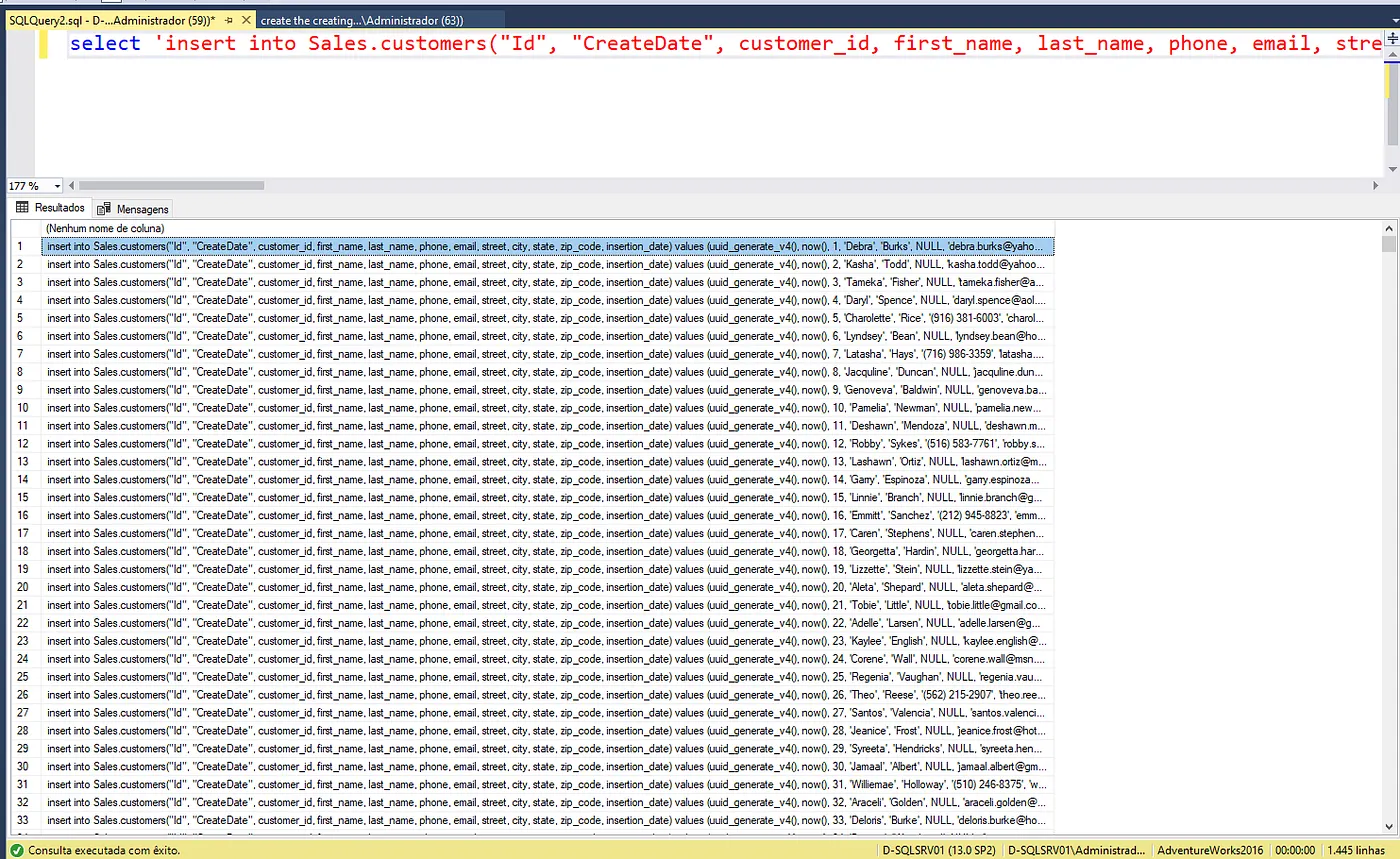
Could you please make it all work in just ONE F5 click, please?
Owww, since you asked so nicely, please comment the last select and paste those 3 lines (could be less? Yes, always could be better :) )
--select @insertStatment + ' ' + @val + ' from ' + @schema + '.' + @table + ' with(nolock) ' as YourScript
declare @TheCreator varchar(max)
set @TheCreator = @insertStatment + ' ' + @val + ' from ' + @schema + '.' + @table + ' with(nolock) '

exec(@TheCreator)
Voilà…
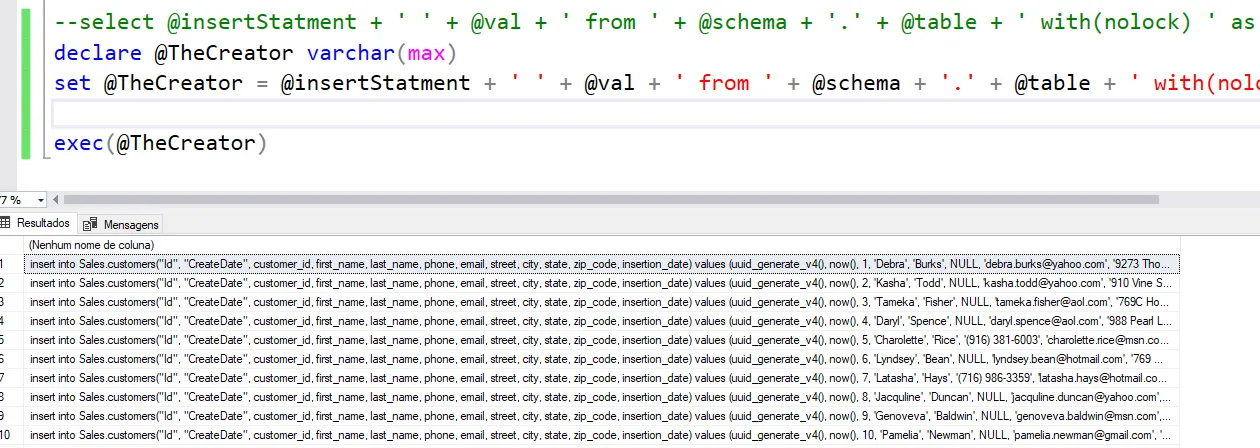 The final product
Right now we have created a script that creates a script with a lot of insertion statements, one for every line of your table, so you can transport all of your data from one database to another, in this sample: SQL Server to PostgreSQL.

If you're still here, congrats!!! Enjoy your new tool.
May God bless you and your family with happiness, purpose, and a full desire to live another day! Life, what a creation!
See you on the next one ;)
Next moves: Since metadata is static information, we can statically cast this piece into whatever we need. There aren’t so many globally used databases, so the next move would be to create those casts from/to every database, for example. Happy coding (: